


Project Lucy Mk1 : The overview
- dheerajgsr2020
- Dec 17, 2020
- 5 min read
Updated: Apr 21, 2021
It took me longer than expected, it took more effort than expected, it took more resources than expected but after all that trouble, it is finally done. Project Lucy is in motion with the first version being completed. But what is Project Lucy you ask? Let me explain.
The need for a digital personal assistant was evident from my perspective because not only can it get things done quickly but help you focus on more important things and do the simpler tasks for you. And that's exactly where I'm going with this. So this 'overly ambitious' project Lucy will be a virtual assistant that runs all my simple tasks like keeping notes or handling my room lights for me (which was the only focus until now) and will be intelligent enough to enable rapid prototyping of any projects I can come up with. Integrating Lucy with my room automation would most definitely call for upgrades because a program like Lucy simply cannot run on an Arduino.
But at the same time, switching out an Arduino for a 'Raspberry pi 4 model B with 8GB ram' or an 'Nvidia Jetson Xavier' with all the bells and whistles didn't make sense either. So for something to bridge the gap between my current setup and Lucy, I thought I'd come up with something less capable but by using a fairly advanced microcontroller for now. This was the ultimate test to see how far a hobbyist like me could reach with a microcontroller based design.
Okay so the first version of Lucy integrates a clock/RTC based functionality to the system which opens up a whole new list of possibilities. The ones I found relevant and useful have been executed in this first version. And those include morning alarms, firstly because who can wake up without one?
Except this isn't your average beep-beep *smash* clock, but this has control of my room lights, so turning them on when it's morning would make a sure shot method to get me out of bed. The second reason is that my room, although had this kind of tech, lacked a clock. Being a geek, I made one myself with a 2.4 inch LCD touchscreen and it makes the whole thing look and speak next-gen. Now a particular 'pain in the a**' with the previous two versions was that I had to switch it off, every time I went to bed and turn it on every morning but now, since it has a Clock running locally, it knows when I go to sleep, shuts down at night and wakes up at the morning alarm and does the hollaing if it is asked to or not otherwise but most importantly, I don't need to take the trouble of turning it on and off which is a really helpful thing.
Coming to the topic of 'seamless integration' or 'non-invasive' techniques, the old method of using servos to actuate the switch has been changed to relay based direct switching of 220V lines. Not only does this reduce turn on and turn off delay but also frees up the wall switches to be used even when the system is completely installed which was not the case with previous versions. Taking version 2 as an example, when the module was installed and running, the switches were only accessible through the servos and that limited how easy it was to not be used. But now, since the relays are in parallel with the switches, either of them can be used. But this method also created a particular loop-hole whose only solution led to the creation of a sensor (of course existing technology).
To elaborate on the problem firstly, what if the user wants to use only the wall switches and have the fancy device do nothing? How will the device know if the user wants to use wall switches only? In other words, how do we grant the user complete control of the lights? If you have gone through my previous blogs, there is a mode where the user gets complete control of the system by asserting a mode variable false, but that was based on the user's input from the IR remote. Similarly, here the pressing of the wall switch is the user input. The sensor has to be able to judge if any specific light is on or in other words, be able to say what switch is in what position. Then the job of the microcontroller is to listen for this sensor to go off which would indicate a user override. This is a very interesting journey, the choice and fabrication of this sensor, for which I will write a separate blog highlighting the technical aspects of the candidates and the thought process behind the choice of one that finally worked flawlessly.
One more addition since the previous version was addition of two LDRs (Light Detecting Resistors) since I have two windows that are on each walls and they face different directions so two LDRs each facing their own side of the window. These send out data that indicate the amount of ambient light in my room which is then used to decide if the room is dark enough for the lights to be turned on or not when a person is detected. But now since it is there, it can also be used for the display auto brightness and stuff like that as well.
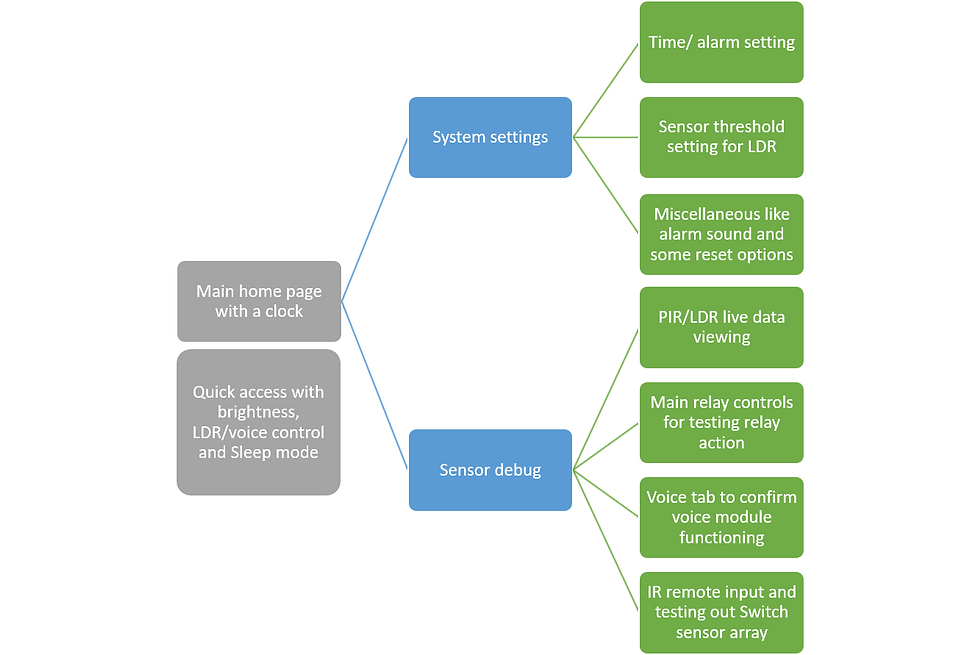
The one thing about this version that stands out is the menu based interface. Now since there is a touchscreen, it has a wider bandwidth than anything before like the IR remote and hence every control threshold and settings like date and time have been implemented through the touchscreen in a menu based format. Not only this but as I have noticed before, debugging the sensors and interfaces was a major issue as I had to detach the sensor from the mount and then probe it to find out the error. And since it is a touchscreen this time around, I have written code that enables debugging and error detection automatically and I can look at the sensor data and say if it is working normally or not. All of this is possible due to the menu based implementation as it would enable me to use the same screen for displaying several submenus and take input to all of them as well.
This version comes with the voice recognition hardware just like the previous versions, but I've been having trouble with getting it to talk to the Microcontroller. As soon as I figure out the what's up with the code, I will try and integrate it with this system. Hope it happens soon...
Update: As of Dec 18, 2020, I have sorted out the error and have got the voice recognition module talking with the Teensy, but not only that, got it working better than before..
This, as I would like to call, it would be the version 3 of room automation but since it's a step closer to making Lucy a reality, I would rather end this tedious way of naming and just call it 'Project Lucy mk1'. So the route that Project Lucy would take would take it from being a simple room automation specific project to being a less specific microprocessor based program that can handle much more than just switching the lights on and off.


Comments